Drag it. Tap to turn it over.

Everything your event hangs on.

Registration, payments, rooms, marking and results, run from one place.

Nobody shares a login.

Four people, four passes. Each one opens only what that person needs.

We ran Asia's largest student entrepreneurship summit, three days and more than 1,400 students, on spreadsheets, a shared inbox and a lot of screenshots.

Payments arrived as photos in Instagram messages. Volunteers shared one password per room. By the second night we were checking marks by hand, because nothing could tell us who had entered what.

So we rebuilt it. Ensign is what we wish we had been running that weekend.
1,400+students through the gate
160+teams registered
12marked rounds across five competitions
12rooms running at once
800+certificates issued afterwards

First run at Asia's largest student entrepreneurship summit, October 2026.

The day

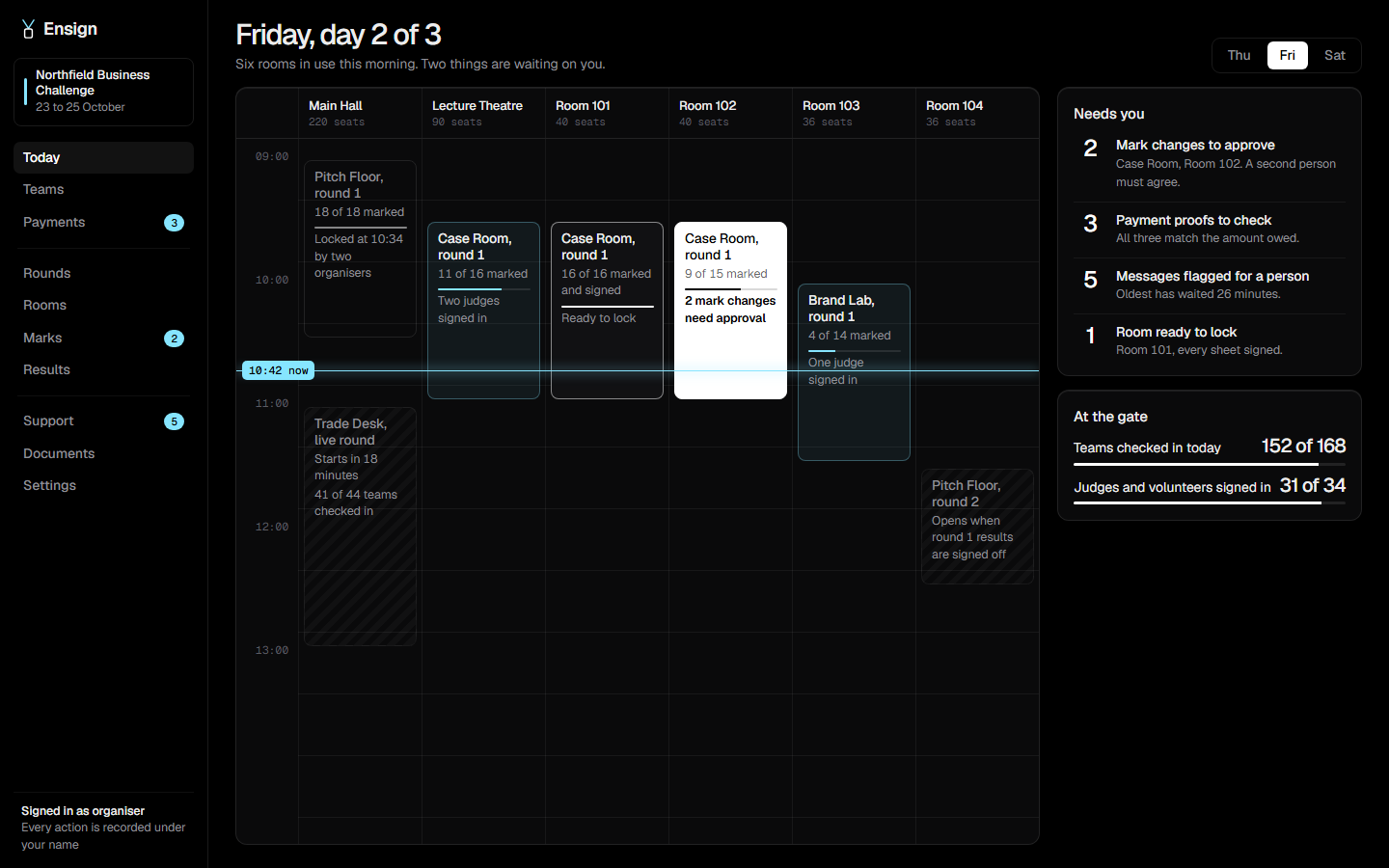
One screen for the whole day.

Keep scrolling. The morning plays out on the right.

  1. 08:30Gates open and passes are scanned in.
  2. 09:30Four rooms are running. Judges are marking.
  3. 10:25Two corrections wait for a second person.
  4. 10:52Rooms lock themselves as sheets are signed.
  5. 11:30The next round opens because the last was signed off.
  6. 12:45The morning is locked.
08:30

checked in
Main Hall220 seats
Theatre90 seats
Room 10140 seats
Room 10240 seats
Room 10336 seats
Room 10436 seats
08:30

What's inside

Six jobs you were doing by hand.

A sign-up form you set up yourself

Team sizes, age groups, fees and the questions you need answered. No developer, no code, and next year you copy this year's.

Team size4 to 6 members
Feeper member, plus a team fee
Guardian consentrequired for under-18s
Photo for the passresized on the phone before upload
Register a team
Team name
School
Member 1 of 5
Guardian's email

Check-in in two seconds

Scan the pass at the gate and again at each room. You always know who is in the building.

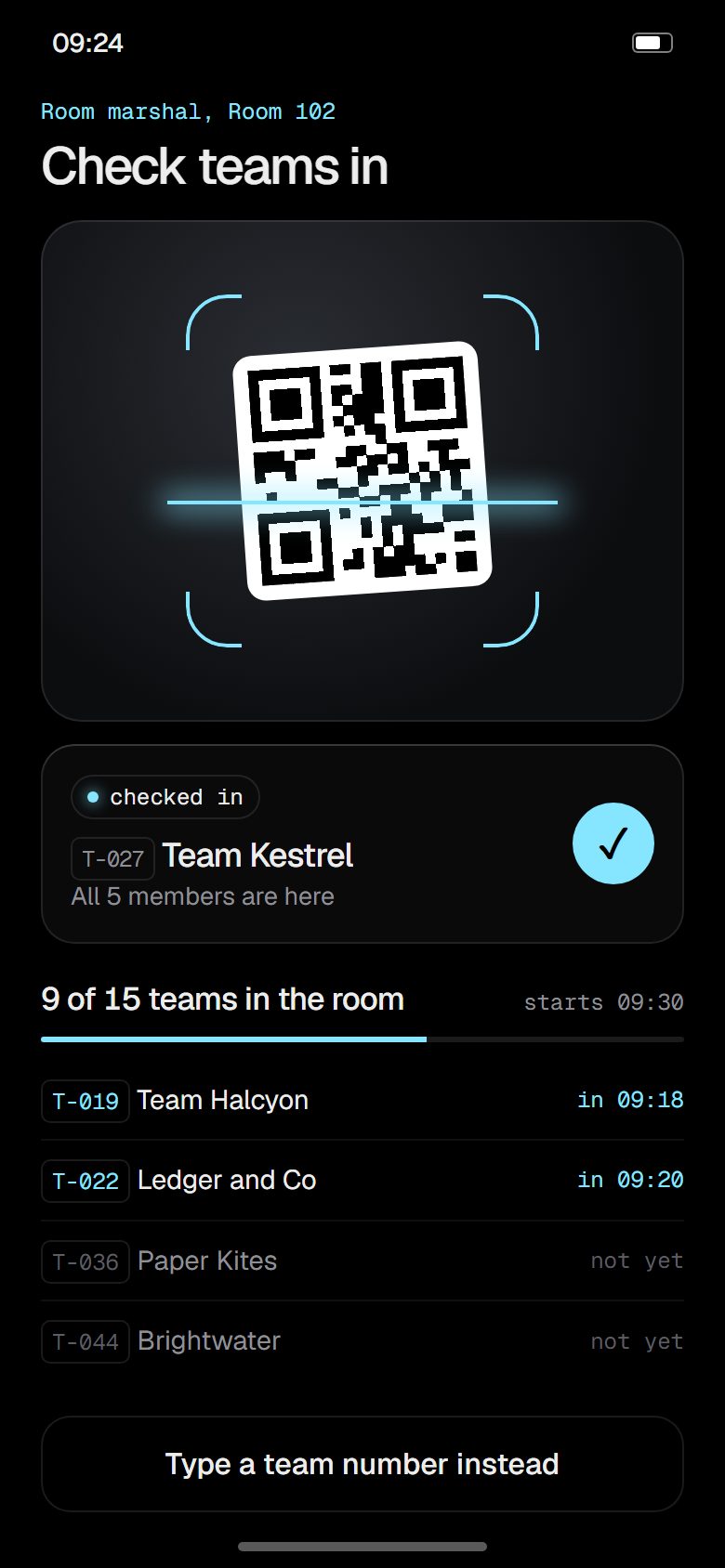
T-027 is in. 153 of 168 teams

Rooms that fill themselves

Give it your rooms and their seats. It places every team, keeps groups together and never overbooks.

Payments, matched

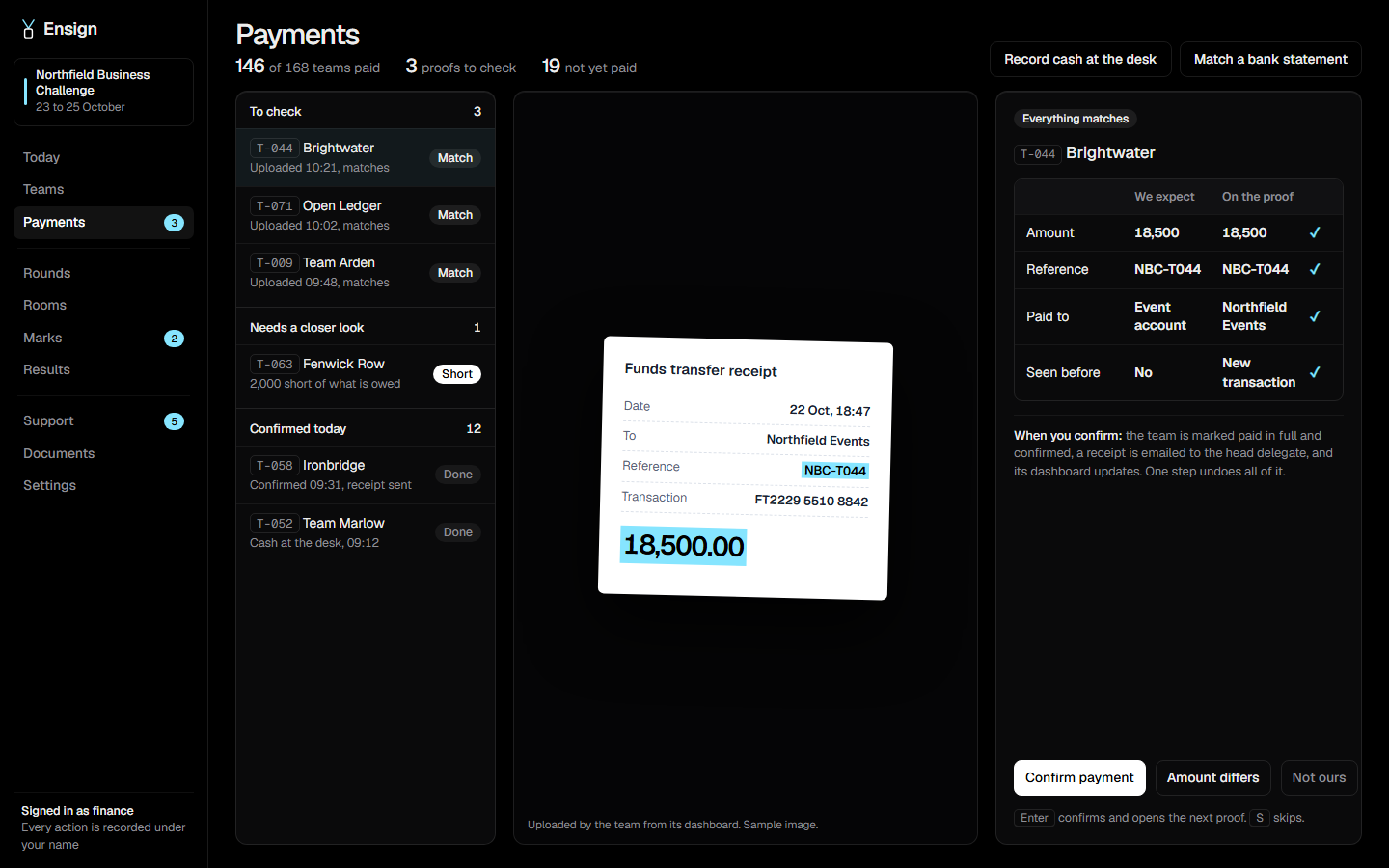
The team uploads proof once. It appears beside what they owe. If the amount, the reference and the account agree, confirming takes one key, and the team gets a receipt.

Funds transfer

ToNorthfield Events
RefNBC-T044
18,500.00
we expecton the proof
Amount18,50018,500✓
ReferenceNBC-T044NBC-T044✓
Seen beforeNoNew transfer✓

Confirmed. Receipt sent to the head delegate.

One inbox for every question

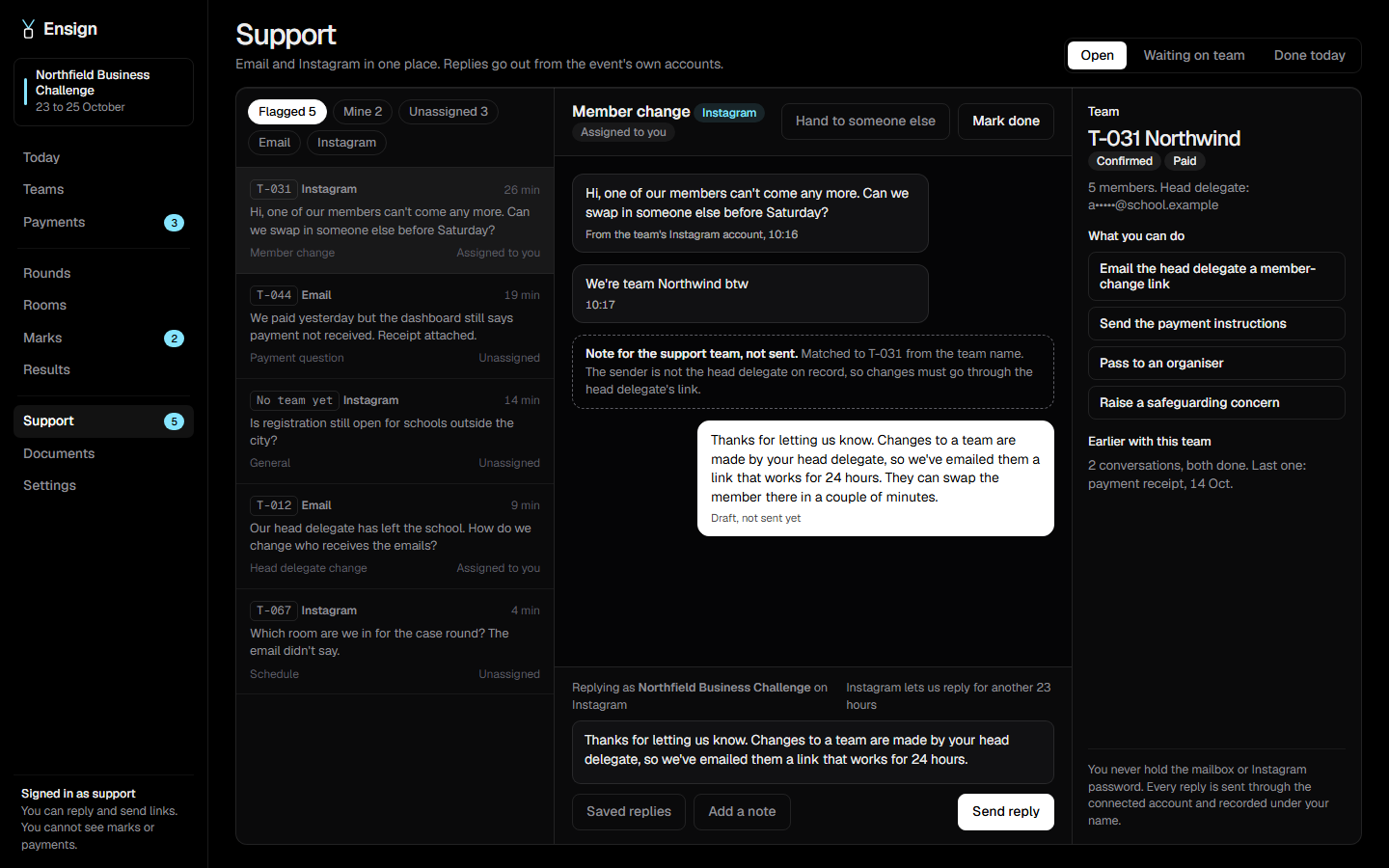
Email and Instagram in one queue. Your support team replies under their own names, and nobody is handed the account password.

One of our members can't come any more. Can we swap in someone else before Saturday?Instagram, 10:16
Matched to T-031. Sender is not the head delegate, so the change goes through their link.
Your head delegate can do that. We've just emailed them a link that works for 24 hours.sent by a support volunteer, 10:19

Results, signed by two

Nothing is published until two organisers sign. What goes out is a fixed copy, so it can't drift afterwards.

organiser 1 signedorganiser 2 signed
1T-022 Ledger and Co84.5
2T-031 Northwind81.0
3T-027 Team Kestrel78.5

In the hand

On the day, most of it happens on a phone.

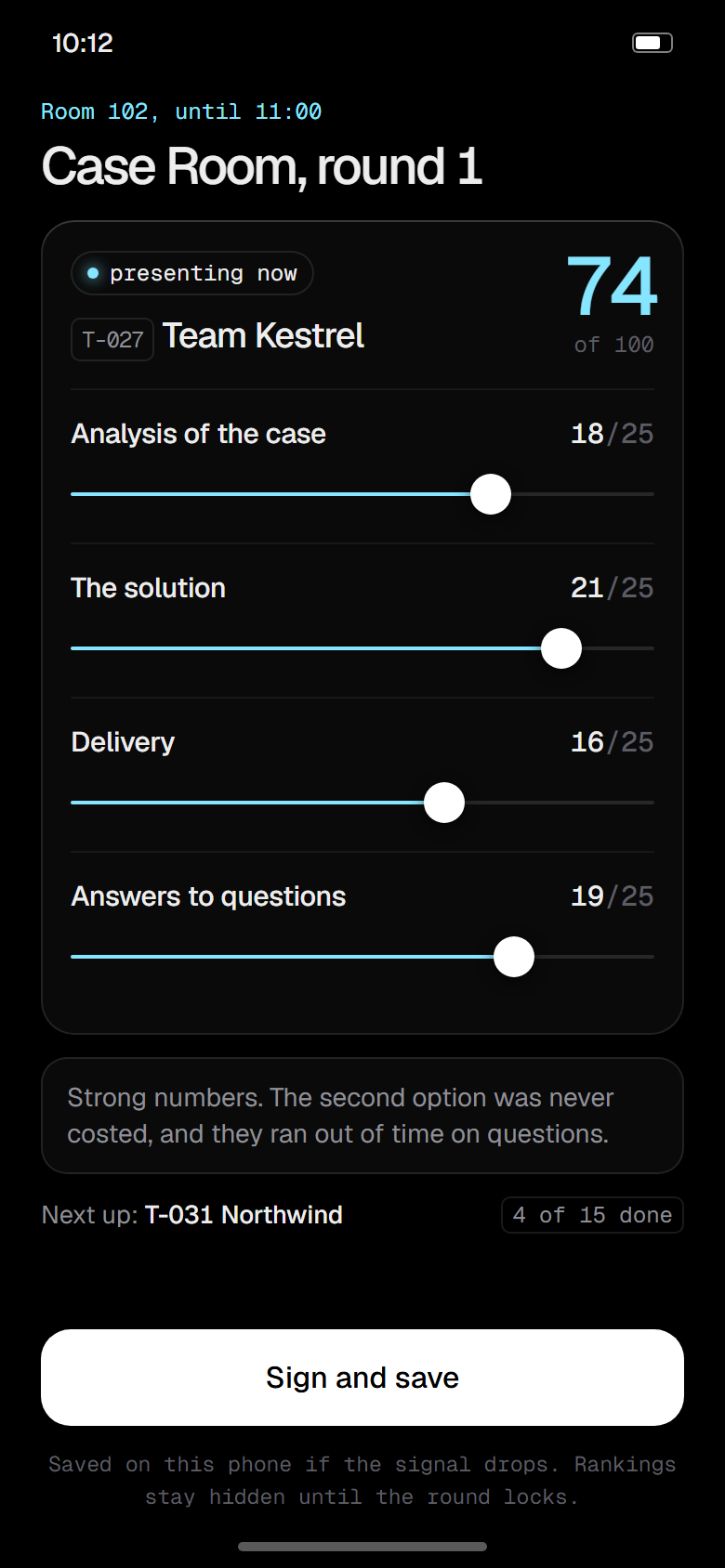
A judge marking a team on a phone
JudgeMark, comment, sign. It keeps working without signal.
A room marshal checking a team in
Room marshalScan a pass at the door. See who is still missing.
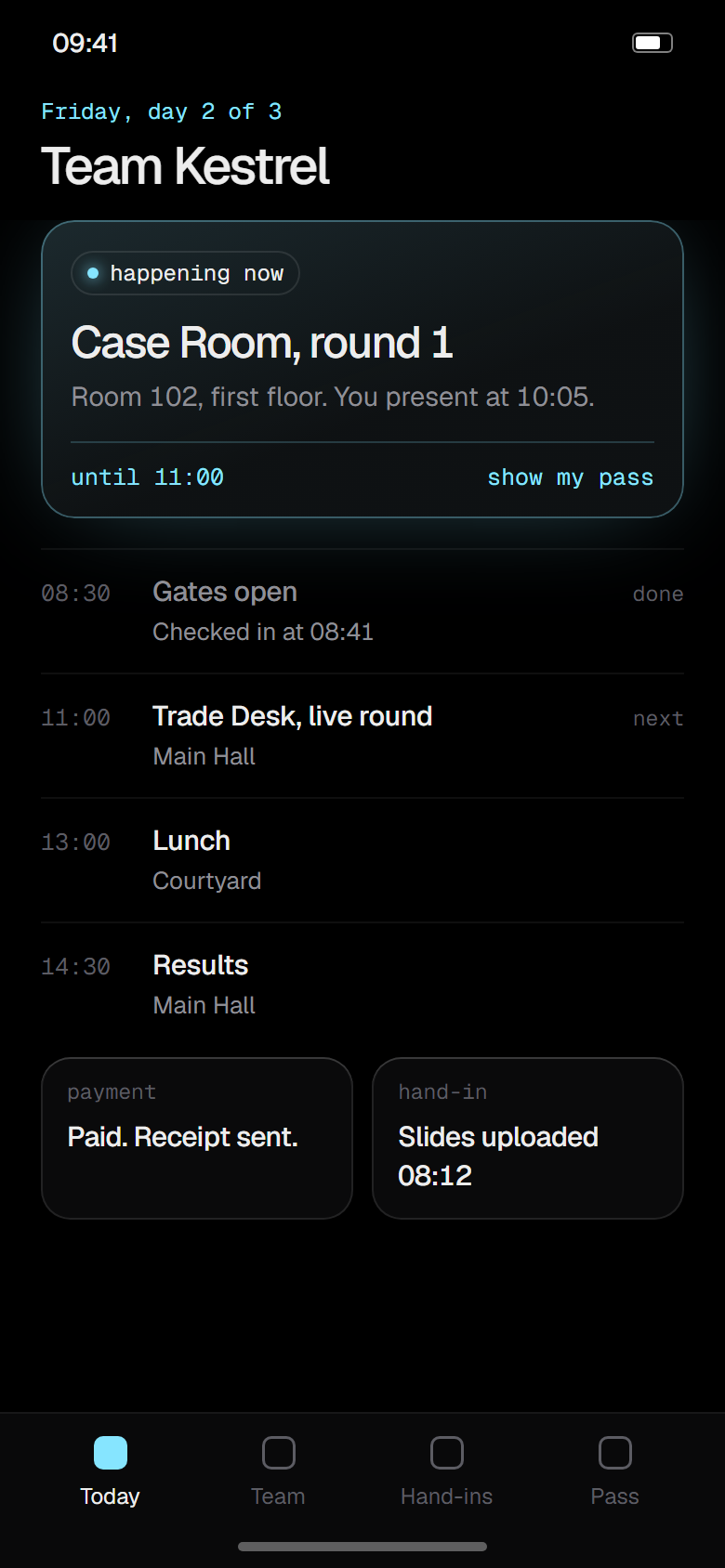
A delegate's view of the day
DelegateWhere to be now, and what comes next.

Screens

Built for the person looking at it.

getensign.com/northfield/today
The organiser's day view
OrganiserThe day, and the four things waiting on you.
getensign.com/northfield/marks
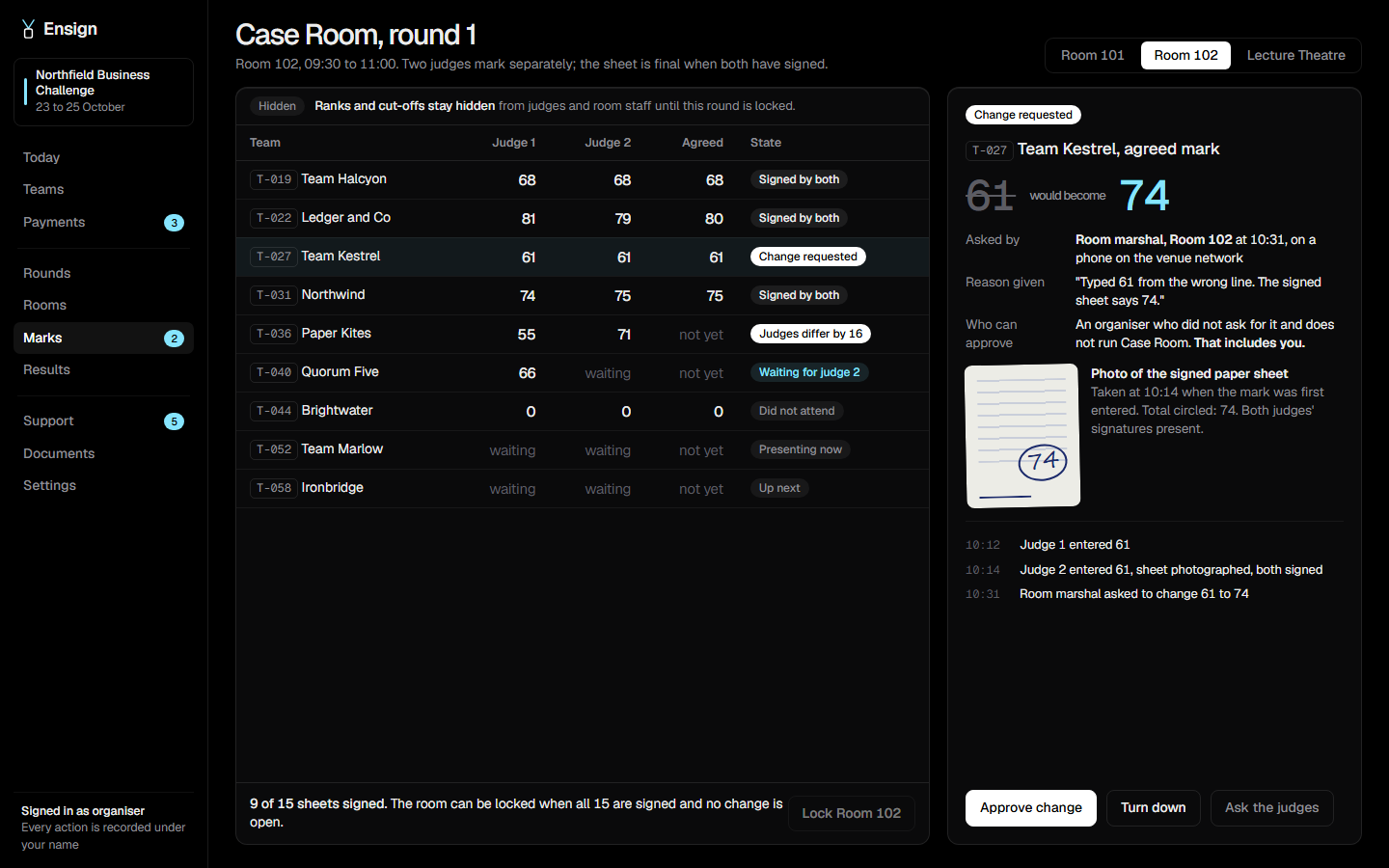
Marks for one room
MarksTwo judges, one agreed mark, and a correction waiting for a second person.
getensign.com/northfield/support
The support desk
SupportThe message, the team it belongs to, and the safe things you can do about it.
getensign.com/northfield/payments
The payments queue
FinanceThe proof beside what is owed. Enter confirms and opens the next.

Marking

A mark is a record, not a cell in a spreadsheet.

Follow one mark from the moment a judge writes it down to the moment the team reads it.

Change requested

T-027Team Kestrel, agreed mark

61would become74
asked by
Room marshal, Room 102
reason
"Typed 61 from the wrong line. The signed sheet says 74."
evidence
Photo of the signed sheet
  1. The first judge marks the team

    On a phone, or on paper. Only during this room's session, and only for teams in this room.

  2. The second judge marks, and both sign

    The paper sheet is photographed. If the photo and the typed mark disagree, it can't be signed.

  3. Someone spots a mistake

    The saved mark is not overwritten. The room marshal asks for a correction and has to say why.

  4. A second person agrees

    Not the person who asked, and not the head of that competition. Both versions stay on the record.

  5. The room locks

    Every sheet is signed and nothing is waiting, so the room closes itself. Reopening it takes two people.

  6. Two organisers sign the results

    Until now, judges and room staff have not seen a single ranking.

  7. Released

    Each team sees its own marks and the judges' comments. What was published is a fixed copy.

Under-18s

Most of your participants are children. We built for that.

Names stay off public pages

Public boards show teams, never individual students.

People see what their job needs

A support volunteer can answer a team without seeing its students' details.

Consent is part of signing up

Guardian consent and the teacher in charge are recorded per student, not chased later.

Account changes go to one place

A password or member change is only ever sent to the head delegate's registered email.

closing an event

  • Results exporteddone
  • Certificates sentdone
  • Students' photos deleteddone
  • Contact details deleteddone
  • Messages deleteddone
  • Record of what was deletedsaved

On the ground

It works where the event is.

1,300

phones behind one venue connection. Most tools read that as an attack and start refusing people. This one was built in that room.

44%

of visits arrived inside Instagram's own browser, where uploads and sign-ins tend to break. Every step is tested there first.

Editions

One product, three kinds of event.

available

Competitions

  • Rounds, hand-ins and draws
  • Rooms, judges and cut-offs
  • Live rounds with a projector view

available

Conferences

  • Registration and payments
  • Sessions, rooms and check-in
  • Certificates anyone can verify

in the works

Model UN

  • Committees and country allocation
  • A chair's console for the session
  • Awards weighted by delegation size
UNSCDISECECOSOCCrisisPress corps

Start to finish

From the first sign-up to the last certificate.

eight weeks out

Open registration

Each team gets a login and a page that says what to do next.

four weeks out

Take payments

Bank transfer with proof uploaded by the team, or cash at a desk with a numbered receipt.

the week before

Plan rooms and send allocations

Cases and topics are drawn fairly, and each team is sent its own and nobody else's.

on the day

Check in, compete, mark

Passes are scanned at the gate and at each room. Judges mark and sign.

that evening

Decide who goes through

Cut-offs, tie-breaks and exceptions are set in the open. The next round opens when two organisers sign.

afterwards

Results, certificates and a clean exit

Publish, send each team its marks, issue certificates, then delete what you no longer need to hold.

Questions

What organisers ask first.

Can judges still mark on paper?

Yes. Most of ours did. The sheet is photographed when the mark is typed in, and the two have to agree before it can be signed.

What if the venue Wi-Fi is bad?

Pages are light and tolerate a dropped connection. A judge's marks are kept on the phone and sent when the signal returns.

Who can see students' details?

Organisers. Everyone else sees only what their job needs: a judge sees team numbers, a support volunteer sees a team without its students' contact details.

Can it look like our event, on our address?

Yes. Each event has its own name, colours and web address. The black and cyan you see here is ours, not yours.

What happens to the data afterwards?

You choose a date. On that date the personal data is deleted and you get a record of what was removed. Results and certificates can be kept without it.

What does it cost?

One price per event, by the number of participants. Small events are free. Tell us the size of yours and we'll give you a number.

Your next event already has a date.

Tell us what you're running. We'll set up a sample with your rooms and rounds so you can click through it before deciding anything.